On-Page SEO: A Beginners Guide
 Don’t just take our word for it. Browse one of our SEO case studies and see what we could be doing for you. We’ve worked across many sectors with businesses and charities of all sizes. We have experience that will benefit you.
URL Length & Structure
A long unweildy URL does your SEO no favours at all. It should be short, snappy and keyword rich. Google’s Matt Cutt’s (ex-head of web spam) has even stated in an interview that the first few words in a URL have more value. Whilst this won’t have a massive impact on your search rankings, adding keywords to the start of your URL and limiting its length is a good habit to get into.
 Page Title Structure

The first and most important signal your website gives the search engines is in your meta title tag, which should be editable through your CMS. It is used most of the time by the search engines in their results , but not always and often only the first 50 – 60 characters are displayed. Write your titles with this in mind and think of it in terms of a signpost which tells the search engine what the page is all about. It should also entice people to take a closer look. The meta title tag is also often used when visitors to your site click on social share buttons.
If your brand is strong enough to pull in site visitors then place it at the front of the title. If not, then the best format to follow is: Primary Keyword – Secondary Keyword | Brand Name. The nearer to the beginning of the title, the more weight it carries.
 H1 – H6 Tags
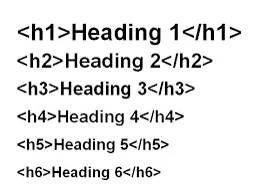
These tags allow your web designer to program the size and font of your headings. Generally you will see the largest headings have the H1 tag with headings getting progressively smaller down to H6 which is the smallest. Using headings in your content allows easy scanning of your content by both site visitor and search engines allowing both to quickly grasp the main subject areas. They are a good place to put your keywords although you should always write to be useful to your site visitors first, so don’t shoehorn them in.
The most important tag is the H1 and you should only use one of these on any given page. For example, if you are selling online then you would use the H1 tag around the name of the product on the product pages. On this page the H1 tag is around the words “On-Page SEO: A Beginners Guide.”
 Image Alt Tags
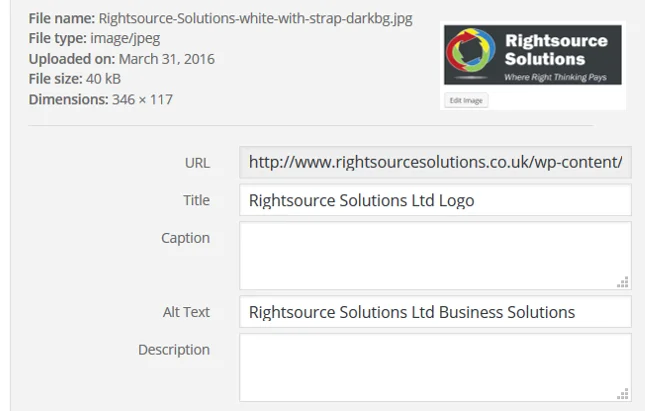
Search engines can’t ‘see’ images on your website. They rely on the alt tag which is a label, added by you which should correctly identify what the image is or in the case of a button, what it does. Blind and visually impaired people using screen readers rely on the alt tag and the image title tag to describe an image.
If you don’t include an alt tag your website isn’t as accessible as it should be. You will also be losing SEO points with Google who specifically state in their guidance for webmasters that you should create great alt text. Make it a habit every time you upload an image and if you have a website full of images with missing alt tags you should talk to your website designer about how to resolve. If you use WordPress some great plugins exist that allow you to edit the alt tags quickly and easily in your media library. A good example is “SEO Friendly Images“.
 Meta Descriptions
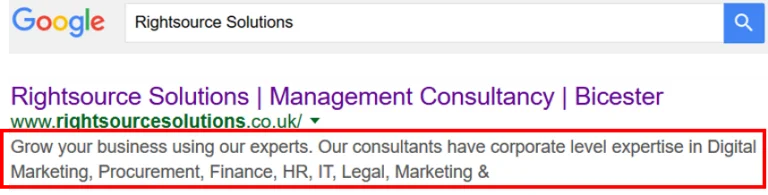
The meta description describes your page, is written by you and is mostly (but not always) used by search engines in their search results. It is the block of text that sits underneath the title on SERPS (Search Engine Results Pages). I’ve highlighted it in this image. Whilst search engines don’t use the meta description for ranking purposes they should still be relevant to the page content to avoid any red flags at Google HQ.
Think of the meta description as your opportunity to write some compelling words designed to give the searcher a reason to click through to your website. It is essentially an advert where you should use keywords intelligently but have your human audience in mind first and foremost. Words used in the search query will be bolded in your description.
You should write between 150 – 160 characters (anything more will be cut off). You must make the description unique on every page to avoid duplicate content penalties.
 Video, Images And Diagrams

A huge block of text is daunting, intimidating and boring. You will lose site visitors quickly with little time spent on the page and only the one page browsed. Both of these metrics (time on page and bounce rate) are measured by search engines and used to inform them about the quality of your page. Poor results will see your pages rank poorly.
On the flip side, writing engaging content, breaking it up with clear headings and using video, images and diagrams will give your visitors an excellent experience, keep them on the page for longer and encourage them to explore more pages on your site (especially when you give them internal links to click on like this one to our SEO page). Don’t forget to compress your images otherwise the page may take too long to load.
 Outbound Links
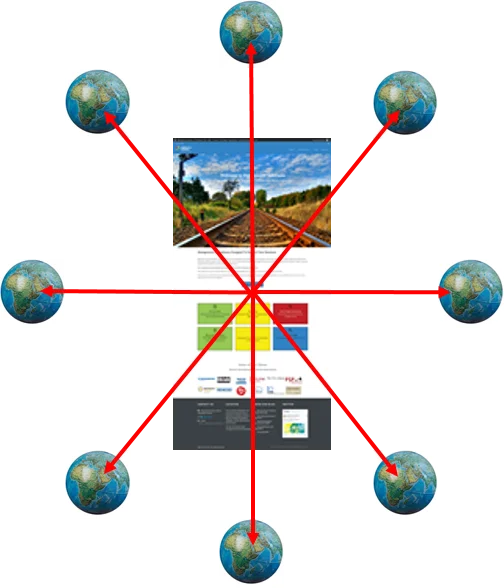
Why would you want to send people away from your site via an outbound link? One reason is that you are showing search engines (and your visitors) relevant information that adds value or perhaps spends more time explaining an aspect of your topic you don’t necessarily want to go overboard on. Adding relevancy helps Google to identify exactly what your page is all about and has been proven to add a rankings boost to your own site, especially when you link to a high authority relevant site such as this one from Google.
Content Writing
 Google is trying to improve it’s search results all the time by striving to recognise quality content ahead of spam. The recent advances in AI have changed things yet again with some results very poor indeed, but we predict this will improve quickly.
Your site will struggle to rank, especially if you don’t write content that is directly better than your competitors i.e. those ranking above you for the same search terms. If you’re not confident about writing quality content, hire a copywriter. They should follow some basic rules:
- The content should meet user expectation i.e. make it relevant to the search terms used to find it.
- Your writing should be written for a topic rather than a specific keyword.
- Demonstrate Experience, Expertise and Authority and be Trustworthy (EEAT).
- Avoid duplicate content across pages.
- Merge old pages into one, fresh page covering the topic area in clear, succinct paragraphs.
- Don’t repeat main target keywords but DO use them in titles and sub-headings, particularly the main page title.
- Use semantic language instead of repeating keywords (“dog walking” becomes “strolling with your canine friend”).
- Read “How to write good website content“.
Use Social Share Buttons
 In 2025, social media signals aren’t just background noise, they’re a powerful indirect SEO booster. While Google doesn’t rank social media posts directly, the noise your content creates on platforms like Twitter, Instagram, or TikTok builds your brand’s visibility and credibility, driving more branded searches and organic traffic. When your content is shared and discussed, search engines notice the surge in traffic, quality backlinks, and genuine user engagement which are all signals that your page is both popular and relevant. In essence, a well-executed social media strategy amplifies your organic reach and reinforces your site’s authority, as long as you focus on quality engagement rather than just generating noise for its own sake.